
—
The Problem
Restaurants and commercial kitchens run on thin margins. Food cost — the single largest variable expense — can swing between 28% and 38% of revenue depending on wastage, portion control, and pilferage. Yet most kitchens reconcile their raw material consumption manually, at end-of-day or worse, at month-end.
A mid-sized restaurant chain approached Arsenal ITC with a specific pain point:
*”We know exactly what we sold from the POS. We know what we purchased from invoices. We know what’s physically on the shelf. But connecting these three numbers — sales → consumption → stock — takes 3 hours of manual spreadsheet work every single day. And by the time we find a variance, the food’s already gone.”*
They were running Odoo 17 Community Edition with the POS module. Purchases and inventory were in Odoo. The gap was the middle layer: automated consumption tracking triggered by sales, adjusted for real-world wastage.
This post covers the full architecture, data model, and key implementation decisions behind the module we built.
—
Architecture Overview
The module sits between three standard Odoo 17 Community modules: point_of_sale, mrp (for BOMs), and stock (for inventory and purchases).
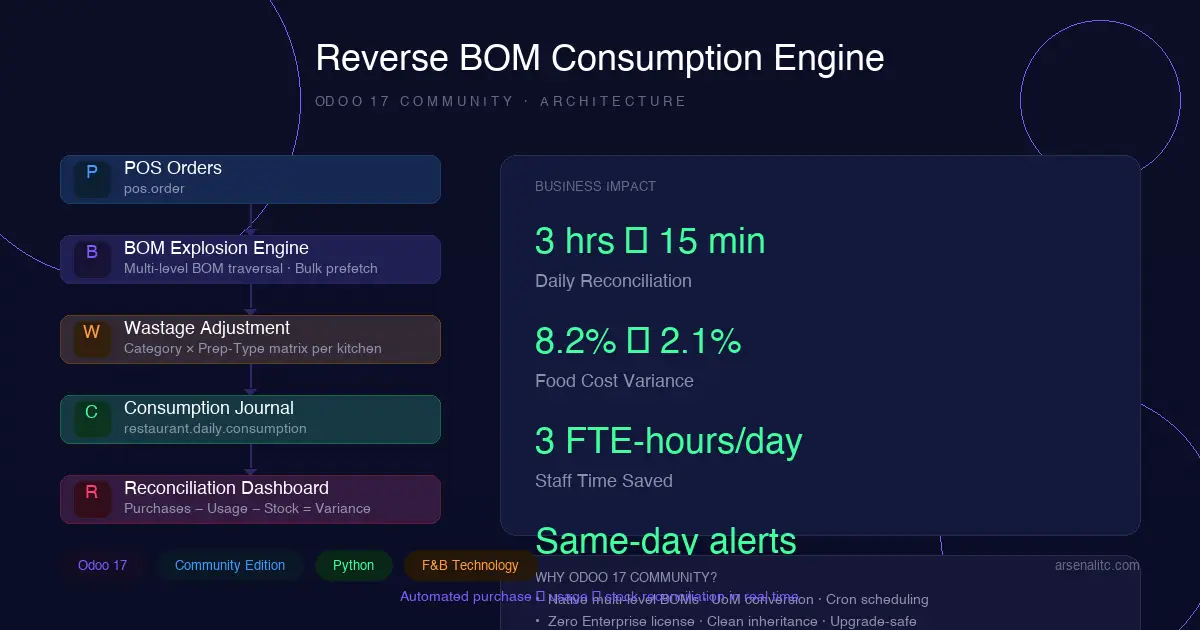
BOM Explosion Engine
The core computational logic: given a POS order line (product × quantity), traverse the BOM tree, accumulate raw material quantities, and apply wastage.
The Reconciliation View
The operational dashboard is built entirely with native Odoo tree views — no custom JavaScript widgetry needed in Odoo 17:
The decoration-danger/warning/success attributes give instant visual triage — kitchen managers can sort by variance and drill into the worst offenders first.
A wizard action triggers the daily computation:
—
Edge Cases Handled
Building this for a real restaurant surfaced several non-obvious problems:
1. Batch Cooking (Multiple BOMs per Product)
A single menu item can have multiple BOMs — one for a batch of 10 portions, another for a single portion. We handle this by preferring the BOM with the smallest product_qty that divides evenly into the sold quantity, falling back to proportional scaling.
2. Unit of Measure Inconsistencies
Recipe BOMs often mix UoMs: eggs in units, flour in grams, oil in liters. The explosion engine runs all conversions through Odoo’s uom.uom._compute_quantity() method rather than assuming consistent units.
3. POS Order Modifications
If a kitchen modifies an order post-submission (substitutions, extra portions), the consumption records for that order must be invalidated and recomputed. We use a pos.order write override that marks affected consumption records as draft:
4. Partial-Day Computations
A kitchen manager might want mid-shift consumption numbers (lunch vs. dinner). The wizard accepts a datetime range, not just a date, so the computation can be scoped to specific POS session windows.
—
Real Business Impact
After 3 months of production use:
The module paid for its development cost within 6 weeks — entirely through reduced food cost variance.
—
Why Odoo 17 Community?
We built this on Community Edition for a deliberate reason: the client didn’t need Enterprise MRP features (PLM, work center scheduling, MES). The Community edition’s BOM engine, stock module, and POS integration are feature-complete for kitchen-scale manufacturing. Adding a custom consumption layer was cleaner than fighting Enterprise features they’d never use.
Key Odoo 17 Community capabilities we relied on:
– Native multi-level BOMs — mrp.bom with bom_line_ids recursion works identically in Community
– UoM conversion engine — uom.uom._compute_quantity() is available in Community
– Server actions + scheduled actions — cron-based auto-computation at end-of-shift
– Studio-quality tree views with decorations — the reconciliation dashboard needs zero custom JS
– Inheritance without monkey-patching — clean _inherit on pos.order with super() calls
—
Next Steps
We’re extending the module with:
1. ML-driven wastage prediction — using historical variance data to suggest wastage % adjustments per product category × season
2. Auto-PO generation — when physical stock drops below a computed reorder point, auto-generate a purchase order for the suggested quantity based on next-day sales forecast
3. Multi-kitchen consolidation — roll-up reconciliation across 5+ restaurant locations into a central procurement dashboard
If you’re building on Odoo Community and hitting manufacturing complexity — the framework can handle more than the marketing materials suggest. You just need to think in terms of clean data models and batched computation, not one-size-fits-all modules.
—
Have a similar challenge with Odoo Community? Reach out at arsenalitc.com — I’m happy to discuss architecture over a call.
—