
Most “slow application” complaints don’t start in the application. They start in the database — in a query quietly doing far more work than anyone realises. The screen feels heavy, users blame the network or the server, and everyone slowly learns to wait.
We recently worked with a finance company whose loan origination and disbursement platform had reached exactly that point. The screens loan officers used dozens of times a day were sluggish, the server was working hard, and the obvious next step on the table was to spend money on bigger hardware. Before doing that, they asked us to look at what the database was actually doing.
The problem: screens that felt heavy, and a database doing far too much work
The platform’s busiest screens are driven by a handful of core stored procedures — the application view, the alert-validation routine, the disbursement document grid, and the CIBIL credit-bureau ID generation. Together they sit at the centre of every loan that moves through the system.
When we captured the live execution plans, the picture was clear. One procedure was reading 689,031 rows to return 2. The optimizer had no good index to use, so it scanned entire tables on every call — and because its row estimates were so wildly wrong, it kept choosing expensive parallel plans for what should have been a tiny, instant lookup.
Why “add more hardware” wasn’t the answer
Bigger hardware would have made the same wasteful work run slightly faster. It would not have stopped the waste. A query that scans 689,031 rows to find 2 is broken regardless of how fast the CPU is — and on a growing loan book, that kind of full-table scan only gets slower as the data grows. The right fix was to make the database stop doing unnecessary work in the first place.
What we did: read the plan, then fix what it showed us
Every improvement came from the same disciplined loop — read the actual execution plan, find why the optimizer was making a bad choice, and correct the root cause rather than the symptom. Four things did most of the work:
- Fixed the cardinality estimates. A single oversized parameter type (NVARCHAR(MAX) where a short string was all that was ever passed) was poisoning the optimizer’s row estimates across the board. Right-sizing it let the optimizer see reality again.
- Added the right indexes — and only the right indexes. Targeted indexes turned full-table scans of hundreds of thousands of rows into instant seeks on the busiest lookups.
- Indexed the temporary tables. One working table was being re-read more than 30 times in a single call as an unindexed heap. Indexing it once made every one of those reads fast.
- Removed the anti-patterns. Single-value IN() clauses became equality seeks, correlated subqueries became joins, and NOT IN became NOT EXISTS — cleaner code that the optimizer could actually plan well, with tighter and safer encryption-key handling along the way.
Crucially, none of this touched the application layer. No rewrite, no new hardware — just the database doing the same job with a fraction of the effort.
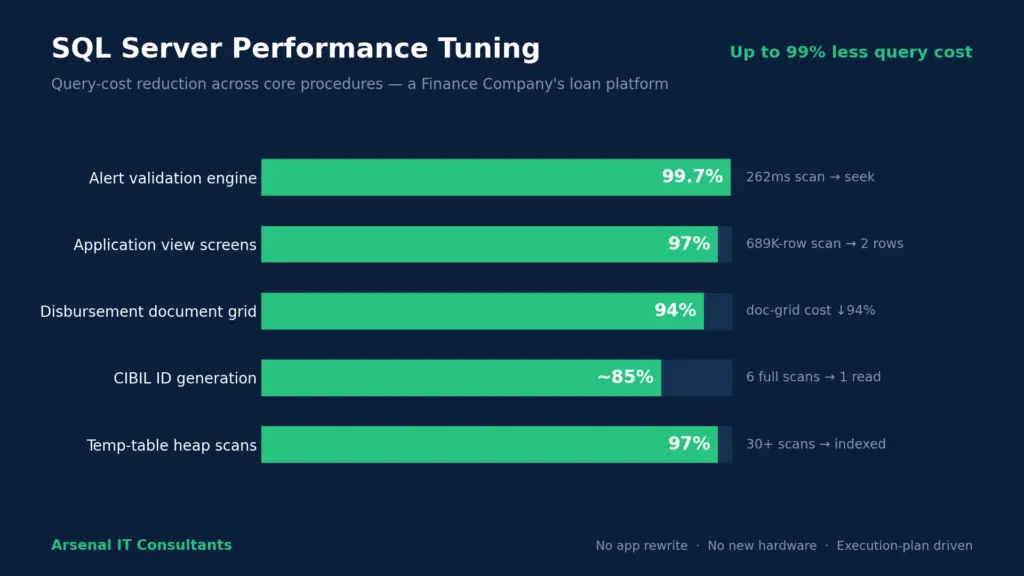
Query cost removed across the platform’s core procedures — up to 97% on the busiest screens, and 99.7% on the alert-validation routine — without a single change to the application.
The bug nobody was looking for
Performance work has a useful side effect: reading code closely surfaces problems no one was hunting for. In this engagement we found a silent data bug. The “Permanent Address” screen was quietly returning the current address instead — a copy-paste of the wrong contact reference that had gone unnoticed. In a lending business, that isn’t a performance issue; it’s a compliance and credit-decision risk. We flagged it and corrected it as part of the same pass.
The result
Across the core stored procedures, we removed up to 97% of query cost on the busiest application screens, 94% on the disbursement document grid, and close to 99.7% on the alert-validation routine — eliminating more than thirty redundant table scans in the process. For the business, that meant faster screens for loan officers, materially lower CPU load, more headroom to grow the loan book, and more accurate data feeding their credit decisions — all delivered without touching the application and without new infrastructure.
The takeaway
When an application feels slow, the instinct is to buy a faster server. More often than not, the real bottleneck is in the database, doing work it was never supposed to do — and the execution plan will tell you exactly where, if someone reads it. The expertise is in the diagnosis and the fix, not in the hardware.
Arsenal IT Consultants provides SQL Server and database performance tuning for businesses whose applications are outgrowing their databases. Get in touch to discuss your system, or read more about our Database (DBA) Advisory Services.